




 |
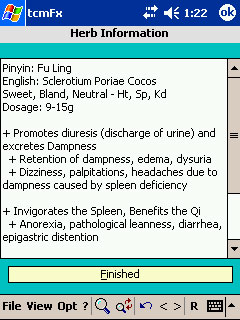
tcmFx, like tcmHerbs Pro, is geared more towards Acupuncture Professionals and Professional Herbalists. This new edition to the family of TCM software will enable you to manage a large compendium of traditional Chinese medicinal formulas, only limited by the amount of storage space on your Desktop computer or Pocket PC. The Pocket PC version makes this database a portable dream for any practitioner. The interface was designed for speed, allowing you to quickly locate the formula you are looking for whether by Pinyin or English name. If you want to quickly find anything about a particular formula the built-in multi-keyword-search engine capabilities are more than enough to tackle any search you can throw at it. tcmFx even links directly to Pocket tcmHerbs PE to display all of your individual herb information when you click on an ingredient in your formula! The Desktop computer edition enables you to have complete control over your formula information. You can make backups and restores if needed, you can search using the built-in multi-search feature and now you can run detailed and customizable HTML formula reports for easy formula management. The user interface contains many keyboard shortcuts to aid you in quickly entering information; you won't even need to touch your mouse when entering new formulas or editing existing ones! Please read on to find out more about these powerful programs. |
TcmFx software will allow you to manage a database of Formulas. Each formula can be broken down into:
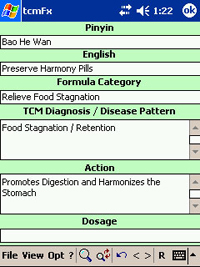
- Pinyin Formula Name
- English Formula Name
- Formula Category
- Formula Dosage
- Page Number where the Formula can be found in your favorite herbal textbook
- Whether the Formula is in Raw (unprocessed) or Patent (pill or pre-made) form
- Formula Action
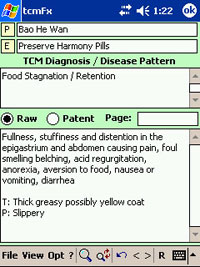
- TCM Pattern / Syndrome / Diagnosis for which the Formula is recommended
- Signs and Symptoms associated with the Formula
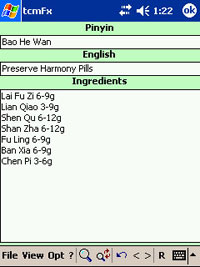
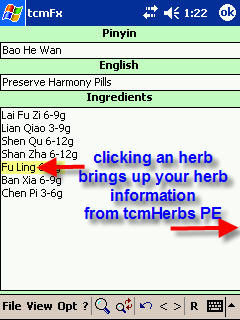
- Formula Ingredient List (see: Special Feature below)
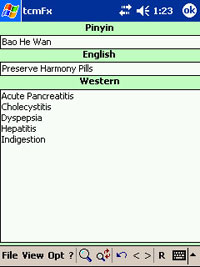
- Associated Western Medical Diagnosis that may correspond with the given Formula's Signs and Symptoms or TCM Pattern diagnosis
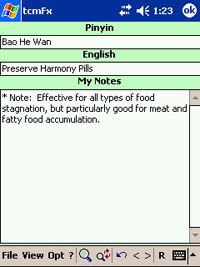
- a 'My Notes' section for entering: Formula modifications / combinations, Contraindications, Cautions, Preparation steps, Text book References, Journal Article References, pertinent Patient Information, your Clinical Experience
With the help of a powerful Desktop Edition of tcmFx for the Desktop PC, you can begin Entering data you may already have or just use the Desktop version to modify the existing database. At any time you can Add new Formulas or Delete existing ones with a simple click.
Once you have your database the way you want it, one click will automatically export it to your Pocket PC for use with Pocket tcmFx. At this point you will have a complete Formula database at your fingertips, including many powerful search and retrieval features such as: Multi-Search, Quick Search List, and List All.
Features of tcmFx:
 Includes
a free educational Formula database containing over 150 of the most
popular
TCM Formulas, most of which are included as part of the California
State Licensing Exam and the National Commission for the Certification
of
Acupuncturists & Oriental Medicine Exams (NCCAOM). You will also
be able to receive free database updates when available.
Includes
a free educational Formula database containing over 150 of the most
popular
TCM Formulas, most of which are included as part of the California
State Licensing Exam and the National Commission for the Certification
of
Acupuncturists & Oriental Medicine Exams (NCCAOM). You will also
be able to receive free database updates when available.
- The free formula database includes:
- Formula Pinyin name
- Formula English Name
- Formula Category
- Formula Dosage
- Whether the Formula is in Raw / Unprocessed or Patent / Pre-made form
- Formula Action
- Formula TCM Pattern / Syndrome / Diagnosis
- Signs / Symptoms indicating the formula usage, along with western medical terminology including explanations / translations
- Formula Ingredient List
- Some Important Contraindications, Cautions and Notes
- Noteworthy Western / TCM research regarding the Formula and its use in current medicine
- Associated Western Medical Diagnosis
- Place holder for you to enter a page number of where the Formula can be found in one of your favorite text books
- Now all you need to do is add your own clinical experiences, your notes and modifications, etc.!
- The free formula database includes:
 |
This
page includes:
|
|---|
 |
This
page includes:
|
|---|
 |
This
page includes:
|
|---|
 |
This
page includes:
|
|---|
 |
This page:
|
|---|
Searching Features and more...:
- Database Searching
Features:
- Quick Search List: This unique feature gives you the ability
to store your frequently typed search terms. Then with two clicks,
you can run the search again, all without re-typing which saves
you a tremendous amount of time.
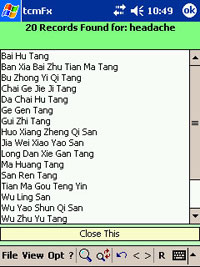
- Multi-Search: This
very powerful search feature allows you to search your database
using up to three different keywords
at the same time. The results will contain Formulas that match
the criteria for all your keyword search terms. For example,
if you
wanted to find Formulas that treat "yang deficiency" and
deal with the "spleen" and "kidney", you just
enter these terms into the multi-search dialog and click "begin
search" and tcmFx will return a list of all the Formulas matching
your search keywords.
- Enhanced Search Results Display:
with this Option enabled, all of your search terms will be turned
to UPPERCASE so
that when you browse through each Formula that was found, your
eyes will be taken quickly to your search text within the Formula.
Ex.
if one of your search terms was "cold", you might see
this text when looking at one of the Formulas: "COLD limbs,
irritability, mania...." or "External Wind-COLD at the
Taiyang..." How's that for handy?
- Quick Search List: This unique feature gives you the ability
to store your frequently typed search terms. Then with two clicks,
you can run the search again, all without re-typing which saves
you a tremendous amount of time.
- TcmFx also incorporates Zap
Power-Off, so you can either exit tcmFx or Turn Off your device, all from the Menu. Saving wear-and-tear
on your Power Button.
- What you also Receive: Excellent customer care and extremely knowledgeable support staff. Questions, comments, troubleshooting or anything regarding our software are all addressed 7 days a week with a usual response time within the day, if not within the hour.
tcmFx also comes with a Desktop version. This is a companion program that runs on Windows 9x, NT, 2000, XP. This program allows you to add, delete and modify your formula database. When you are satisfied with your database, click the "Export.." button and your database is immediately available to your Pocket PC tcmFx software.
Here are just some of the features of the Desktop version:

- Multi-Search,
see the picture above.
- Very powerful feature allowing multiple keyword searches
- If you are viewing in swap mode, the search results will list the Formulas by English name
- Very powerful feature allowing multiple keyword searches
- Advanced
Reporting. Now you can create customized reports of all your formulas.
Pick and choose which fields to include in your report and even customize
the colors and layout. Once click will generate a colorful HTML report
of all your formulas.
- Create reports for use in your clinic or practice
- Great feature for students who want study material
- Nice feature for creating hard-copy backups
- Advanced Database
Information dialog
- Allows for easy database backup
- Displays your database properties
- Shows the last time you exported your database to your Pocket PC
- Indicates if you modified your database since your last export
- Displays your formula statistics
- and more...
- Built-in Database
Upgrade manager. Allows you to easily upgrade your database with
any new database that are released.
- Increased File Transfer Speed: usually less than 20 seconds for a full database transfer via USB on new Windows Mobile 2003 / 2005 devices, even faster if using USB 2.0
- Large database support and large record sizes, allows for virtually unlimited database size
- Built-in file transfer! With true 1-click ability, Desktop tcmFx will automatically transfer (export) your database to your Pocket PC
- Ability to pull up Formulas by using their English or Pinyin names
- Screen settings, database location, and other settings are remembered for the next time you start Desktop tcmFx
- Format and View your data exactly as it will be displayed on your Pocket PC. The desktop edition makes for easy data layout and formatting
- Complete Readme Help File
- Advanced Backup / Restore for your Formula database for safe keeping
- A "Control center" for easy record navigation
- Multiple quick shortcut-keys such as Alt+N or Alt+D to add New or delete existing records. Tab controls help you enter information without using a mouse - increasing speed and saving time - just start entering data and click the Tab key to move to the next entry
- Auto-save feature
If you want to be able to click on a Formula ingredient and view the individual herb information, you must be a registered owner of tcmHerbs Professional Edition v. 2.1 or higher. These two programs are designed to communicate with each other allowing you to utilize this special feature.
The free educational database (database version 08162004.152) includes these formulas
Will this Software work with your Pocket PC? / Is your Device Compatible?