


 Introducing
Pocket AcuPoints
Introducing
Pocket AcuPoints
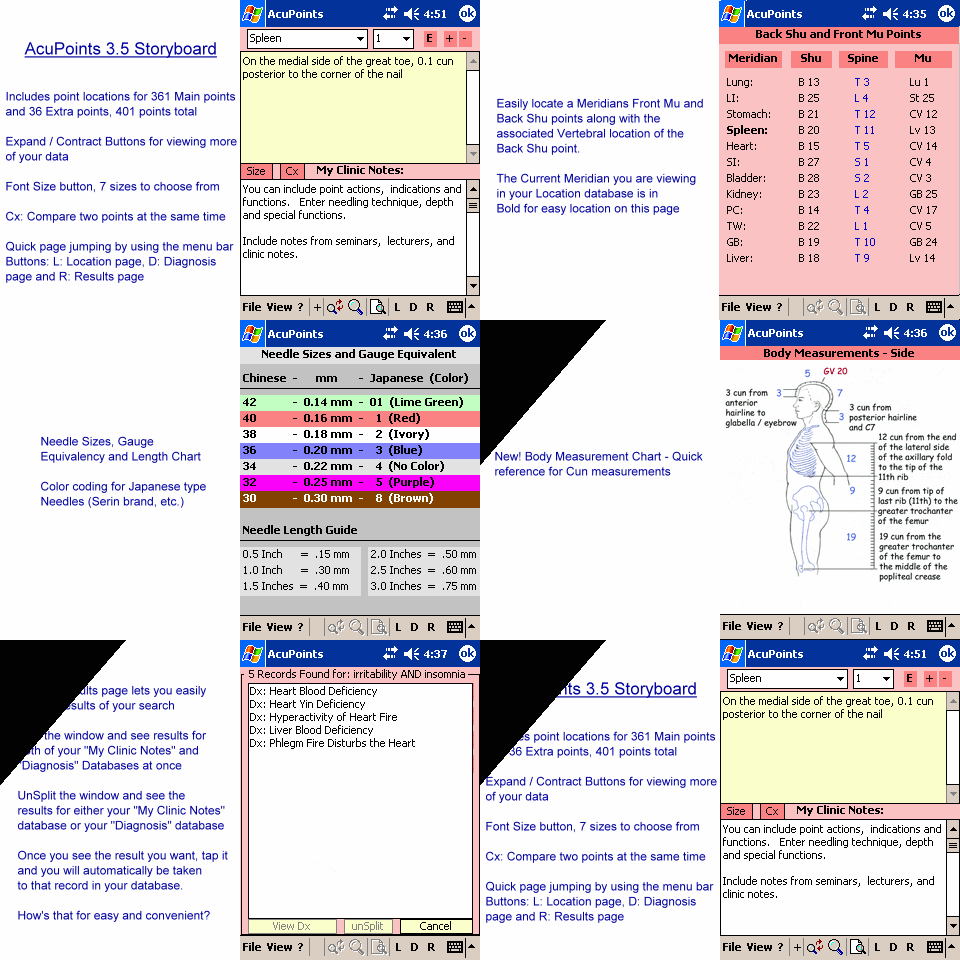
Please view the new AcuPoints 3 Storyboard Picture above (..may take a bit to load..)
Take the quick 3 minute story board tour now!
| - Brief Summary of Features
|
AcuPoints is an all-in-one program which addresses the needs of Acupuncture Professionals as well as Students of Traditional Chinese Medicine. This software includes two great packages. The first, and most important, includes many features that are not found in any other Acupuncture software program to date. This package, called Pocket AcuPoints, is installed on your Pocket PC and allows you to not only access your Acupuncture point "My Clinic Notes" and your TCM Diagnosis databases but also includes:
The second package is a desktop version of AcuPoints for Importing, Entering / Modifying information related to both Acupuncture Point clinic notes and TCM Diagnosis. This package allows you to Import your databases from Pocket AcuPoints or Export your Desktop databases to Pocket AcuPoints. The desktop version enables you to quickly enter, change, add, delete and modify information using your regular desktop PC. If you are computer savvy and already have external data ready to import into AcuPoints, the Desktop version allows importing from a Text file or Excel spreadsheet (included). This new edition also adds Multi-Keyword Search capabilities that provides results from both your "My Clinic Notes" and Diagnosis database sections. As you can see, these two packages are comprehensive and yet completely expandable. Imagine what you can do. Please read on to find out more about these powerful programs. |
- Location Database page:
- Includes the standard Acupuncture Point locations of all 361 main
meridian acupuncture points AND
36 Extra points for a total of 401 points.
- This page includes a blank 'My Clinic Notes' area where you can keep track of: Point Actions, Indications, Needling Technique / Depth, basically anything you need to have associated with a particular point - Just type it in directly or import any existing data you have via Desktop AcuPoints.
- With the new "Size" button located on the Location page, you can easily change the display font size. Increase for easier reading or decrease to show more information per page.
- Cx: Compare
function allows you to compare two acupuncture points at the same
time!
- Md/CI/Ca: Quickly jump to Needling methods, Contraindications, Cautions in your clinic notes.
- Includes the standard Acupuncture Point locations of all 361 main
meridian acupuncture points AND
- Diagnosis & Treatment Database page:
This page
contains over 50 TCM Diagnosis complete with Signs
/ Symptoms and Acupuncture treatment points. You have the ability
to Create, Edit, Delete and Customize your own diagnosis and treatment
protocols. Now you can create specific diagnosis with associated treatments.
Click a Diagnosis and all the associated information appears. You can
add: points, signs / symptoms, tongue / pulse, formulas, herbs, etc.
- Mu / Shu / Spine page: Includes each of the 12 main meridians
and their associated Back Shu point, spinous process where the Shu point
can be located from and the Front Mu of each meridian.
- Influential / Command / Confluent page: Includes all the Influential
points (ex. UB-17 Influential for blood) and 4 Command points for each
body area (ex. LI-4 for the Face and Mouth area).
- The 8 Confluent Points with Pop-up Indications.
- The 8 Confluent Points with Pop-up Indications.
- 4 Point Needle Technique page: This page takes all the hard work
out of finding the Tonification and Sedation points according to the 4
Point Needle Technique. Just choose a Meridian from the drop-down box
and all the points are displayed instantly. COLOR
Coding leads your eyes right to the set of points you need.
- Miscellaneous Points page: Displays the Entry, Exit, Horary,
Luo, Source, XI, Lower He-Sea, Tonification, and Sedation point for any
given meridian. 5-element points are also included: Well, Spring, etc..
with automatic COLOR
coding according to the 5-elements & Yin / Yang organ designation.
Ex. Well points for Yang Meridians begin on the Metal element hence the
well point color is White, etc.. Also, the Active time for the Organ is
displayed according to the Midday - Midnight Cycle.
New to this
version is the currently active Organ. Pocket AcuPoints displays this
based on the current time of day.
- Needle Sizes and Gauges page: Displays a page with Chinese Gauge
to Millimeter to Japanese Gauge conversions. COLOR
coding is used to denote the Seirin brand needle handle color. Also, at
the bottom is a needle length conversion from inches to millimeters, etc.
- Front, Back and
Side Body Measurements page: Displays a picture with the anatomical
Cun measurements for the human body.
- Search Results page: Forget running a search again! This page
displays a list of your last search results. Easily compare and contrast
your search hits. The Toolbar holds a button to quickly access this page.
- Now the new
searching feature traverses both databases at once - searching your
"My Clinic Notes" AND "Diagnosis" databases
at the same time. Then the new unified Results page returns the items
that matched your search in a 3-state window. This allows you to view
results from both databases at once (the Split-View), or just the
results from the "My Clinic Notes" database (the View-Points
view) OR just the results from the "Diagnosis" database
(the View-Dx view). It's completely up to you how you want to see
your search results, just click a button!
- Single Search: allows you to search for ANY text
in your 'My Clinic Notes' section. So, if you typed in all the actions
for each of your points, finding all the points that, say 'Clear Heat',
is a snap. AcuPoints produces a list of all the points that contain your
search term then a single click brings you right to that point. How's
that for fast and easy?
- Smart Searching (borrowed from Pocket tcmHerbs). Intelligence
is built into AcuPoints allowing you to use the stylus to highlight any
text and click the Search button to instantly run a search. NO typing
is needed!
- Multi-Search:
This very powerful search feature allows you to search your databases
using up to three different keywords at the same time. The results will
contain records that match the criteria for all your keyword search terms.
- Quick Search List:. This feature gives you the ability to store
your frequently typed search terms. Then with two clicks you can run the
search again, all without typing - saving you a tremendous amount of time
and retyping, especially when you are with a patient.
- List All: This button generates a sorted list of all Acupuncture
points in your database, complete with a quick Navigational pad.
- Jump Feature: Say for example you list certain points for a certain
treatment in your Diagnosis database - ex. St-25 is listed under 'Damp
Heat in the Large Intestine' as a point for Draining Heat from the Intestines
. Wouldn't it be nice to simply highlight a point in your treatment section
and have AcuPoints Jump right to that point in the location page allowing
you to quickly reference it? Well you can now, just highlight 'St-25'
and JUMP to it.
- TIP: Did you know
that if you highlight ANY word in your Diagnosis database notes and
Click the 'Jump' Button that Pocket AcuPoints will search all of your
databases for a match? The Jump feature is not just limited to locating
Points
- TIP: Did you know
that if you highlight ANY word in your Diagnosis database notes and
Click the 'Jump' Button that Pocket AcuPoints will search all of your
databases for a match? The Jump feature is not just limited to locating
Points
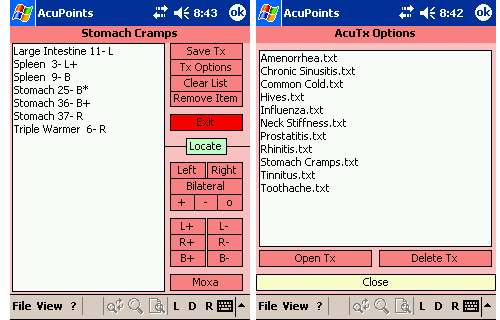
- AcuTx: Create
your own custom treatment protocols and save them for later reference.
Choose which points you want to add and then decide if you are going to
needle them with a Tonification or Sedation technique. Decide if you are
want to needle the points on the Left, Right or Bilaterally. Want to add
Moxa to the points? You can even share your AcuTx protocols with other
users of AcuPoints! Imagine the uses:
- You are sitting around the local coffee shop. You are thinking about what point protocol to use on your next patient, Bob Smith. You pull out your Pocket PC and begin browsing through your Points and adding them to your AcuTx Protocol list. Once satisfied, you save your AcuTx. Then when Bob arrives at your office you quickly browse your "Bob Smith - 12/01/04" AcuTx protocol and off you go.
- You are browsing through "Acupuncture Today" and notice a treatment protocol you would like to try for the "Common Cold" - you have your Pocket PC handy so you quickly and easily enter the points into AcuTx and off you go.
- You are at a seminar listening to a speaker describe great success by using certain points, you take good notes and then later create an AcuTx protocol based on the speakers experience. Ex. "Dr. Yang's Point Protocol for Occipital Headache"
- etc, etc.
- Full-Featured Edit menu: Cut, Copy, Paste, Delete, Undo, Select
All...
- ADDED BONUS! Now AcuPoints incorporates Zap Power-Off (ARM), so you can either exit AcuPoints or Turn Off your device, all from the Menu. Saving wear-and-tear on your Power Button.

Other Features in Pocket AcuPoints Version 3:
- Quickly view your
Pocket PC database path for use with Desktop AcuPoints
- Redesigned interface allowing you to view 10% more of your information at once.
- Increased searching engine speed.
- Expand & Contract buttons in the Diagnosis / Treatment & Clinic Notes sections allow full viewing of your notes.
- AcuPoints now remembers your Expand / Contract Settings and the last page you were on.
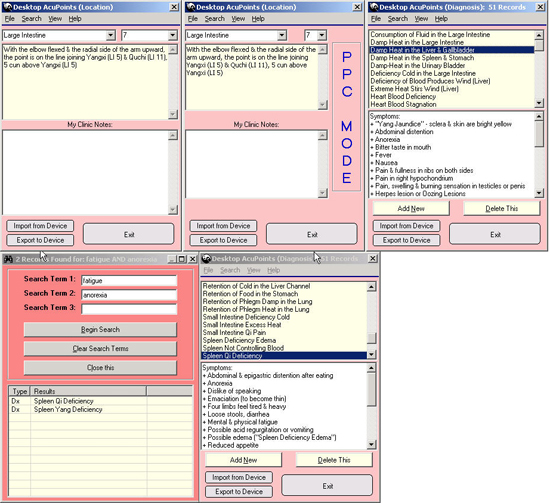
AcuPoints also comes with a Desktop version. This is program runs on Windows 9x, NT, 2000, XP allowing you to enter or import your data from a Text file or an Excel spreadsheet right into AcuPoints, making it instantly available to your Pocket PC. Here are just some of the features of the Desktop version:
- Desktop AcuPoints
now features Multi-Search, the very powerful multi-keyword search utility.
- Import and Export to and from your Pocket PC
- Built-in file transfer! with true 1-click ability, Desktop AcuPoints will automatically transfer (export) your database to your Pocket PC
- Increased File Transfer Speed: less than 6 seconds for a full database transfer via USB on Windows Mobile 2003 devices, even faster if using USB 2.0
- Large database support and large record size increase for your "My Clinic Notes" section
- Import from a .txt file or Excel spreadsheet (no need to retype data you may already have)
- Backup / Restore your data to keep it safe - Version 3.0 adds the ability to Backup and Restore from any drive / folder, not just the Floppy Disk
- If you don't have any data to import, Desktop AcuPoints makes it very quick and easy to type (or Copy / Paste) your Notes right into the program, then you can Export the data to your Pocket PC!
- Diagnosis and Treatment Section with full Backup, Restore, and Export functions
- Quick shortcut-keys for entering data and saving you time
- Auto-save
Other Features in Desktop AcuPoints Version 3.5:
- View your data exactly as it will be displayed on your Pocket PC with the new 'View in Pocket PC Mode' option. Makes for easy data layout and formatting. What you see is what you get!
- You can now specify 'Carriage Returns' in your .txt file data so that AcuPoints can format your information accordingly.
- Maximized sizes of drop down boxes for easier selection of points
- Enhanced Documentation with examples.
Will this Software work with your Pocket PC? / Is your Device Compatible?